The procurement operating platform.
Request, source, compare, approve, order, receive, match and measure in one controlled environment. Each stage below is described as the software works today.
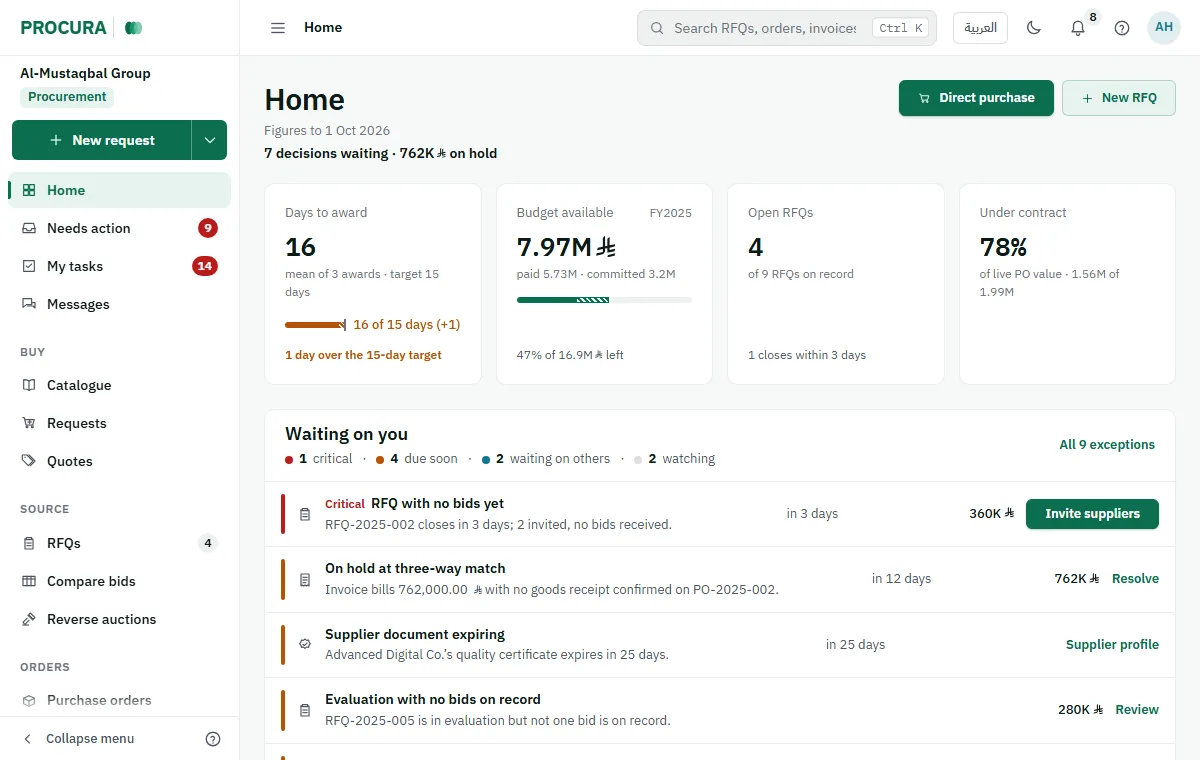
Every stage: what happens, who acts, the control and the outcome
Eight stages, as the software works today. Choose a stage to read it.
Request
- What happens
- A need is raised with its specification, quantity and cost centre.
- Who acts
- Requester, procurement
- Control
- When an RFQ names a cost centre, the award is checked against that budget and commits its amount there, so commitments show before they become spend.
- Outcome
- Every request has a route and a record: procurement sends it to the catalogue, an RFQ, a contract or a purchase order.
Source
- What happens
- An RFQ, a reverse auction or a two-envelope tender: public, limited to invited suppliers, or direct to one supplier with a stated reason.
- Who acts
- Procurement
- Control
- Every clarification answer is published to every bidder, and the asker is never named.
- Outcome
- The same information for everyone
Compare
- What happens
- Bids are compared line by line against weighted criteria.
- Who acts
- Procurement
- Control
- Bids stay sealed until the deadline, and the evaluation weights lock when the first bid arrives.
- Outcome
- A scored comparison on the record
Approve
- What happens
- The award recommendation routes by value to the people whose authority covers it.
- Who acts
- Procurement manager, CFO, CEO
- Control
- Approval limits by value; nobody approves their own request; a second approver, never the awarder, when there is one bid or the chosen bid is not the top-scored one.
- Outcome
- Every decision carries a name and a reason
Order
- What happens
- The purchase order is issued line by line from the winning bid and held by default until both parties sign its contract; every later change is recorded.
- Who acts
- Procurement, the supplier
- Control
- Contract before the order moves, on by default
- Outcome
- The order and its contract on one record
Receive
- What happens
- The receiver confirms what arrived, with a receipt code at handover where one is used.
- Who acts
- Requester, warehouse
- Control
- A receipt is never more than is still outstanding on the order.
- Outcome
- A goods receipt the match can rely on
Match
- What happens
- No payment instruction until the purchase order, the goods receipt and the invoice agree; an invoice that does not match is held with its reason.
- Who acts
- Accounts payable
- Control
- The requester never approves. Whoever receives the goods cannot accept their invoice, and whoever accepts the invoice cannot instruct its payment.
- Outcome
- No payment instruction before the match
Analyse
- What happens
- Spend, savings, cycle times and each category's largest supplier share come from the same records, and export as CSV.
- Who acts
- Finance, leadership
- Control
- One source per figure, with the period stated
- Outcome
- See where each request waits, and with whom
Sourcing
Raise an RFQ, a reverse auction or a two-envelope tender from a requisition or from scratch. Invite the suppliers you choose; a question asked by one supplier is answered to all. Bids are encrypted until the deadline and opened together.
- Direct awards with a written justification
- Extend, revise, cancel or re-tender with the reasons kept
- Weighted evaluation locked at the first bid
- Line-by-line auctions
Supplier management
Suppliers register, submit their company documents once for the operator’s review and keep their own records. A supplier's 14-day free trial starts with its first RFQ invitation, quote request or bid, and nothing is charged automatically. It does not start at sign-up. Standing, documents and performance stay on their profile.
- Document review with expiry dates
- Approved, preferred, probation or suspended standing
- Two-way ratings after each order
- Supplier-owned bank details, with payments held after a change until the operator has confirmed the account
Approvals
Requisitions and awards route by value to the people whose authority covers them. The person who raised something never approves it, and every decision carries a name and a reason.
- By default, manager up to SAR 100k, CFO to 500k, CEO above
- Award recommendations signed above the manager tier
- Change orders approved on the new value
- Every rejection carries a reason
Purchase orders
The order and its contract are issued from the winning bid, line by line, with the supplier’s item code on every line. Catalogue requisitions reserve budget and become one purchase order per supplier.
- Framework agreements with ceilings and contracted prices
- Catalogue buying with price tiers and quotes
- Instalment receipts and invoicing
- Budget reserved at award, released on cancellation
Receiving and matching
The receiver confirms what arrived, by a six-digit code at handover if you want it. Invoices are matched to the order and the receipt before anyone pays.
- Three-way match with VAT by tax category
- Receiver, acceptor and payer are different people
- Late-delivery penalties and retention
- Returns with coded handover and credit notes
Contracts
Every award drafts a contract with fingerprinted terms that both parties sign. Renewals are new versions; terminations follow the order state.
- SHA-256 fingerprint on every version
- Signing authority checked against the value
- Renewal list for contracts ending within 120 days
- Framework call-offs against a ceiling
Measure what your procurement does
Eight views of your own records, each with its period and how it is counted.
Procurement outcomes
Period: 1 December 2025 (10 Jumada II 1447 AH) – 30 November 2026 (20 Jumada II 1448 AH)
Request to orderNot enough records yet: 3 of 5
Invoice to paymentNot enough records yet: 3 of 5
Delivered by the due dayNot enough records yet: 3 of 5
Days at every stage
See the days from request to order, and from invoice to payment.
Your organisation's own records; a median shows once there are five.
Control before commitment
Budget, approval limit and contract are checked before an order moves; overrides show apart.
The contract check is on by default; a CFO or CEO may release an order with a reason, and it is counted.
Spend you can trace
Committed spend by category, cost centre, department, supplier and contract basis.
Only what runs through Procura; agreements recorded from outside carry no orders.
Buying outside agreed channels
See purchases outside your approved catalogue or agreements: worth checking, not an accusation.
Only purchases made in Procura can be seen; no person is named in the figures.
Delivery and supplier base
See your orders delivered by their due day, and contracts nearing their end.
On time compares the handover with the order's due day. Procura is not a demand-planning tool.
Supplier records from your orders
On time and accepted at inspection for each supplier; returns and your own ratings for your organisation.
Built from your organisation's orders only; never compared with other organisations.
Invoices matched before payment
See which invoices are held and why, and which were paid by their due date.
Payment is a bank transfer outside Procura; it counts once a second person reconciles it.
Competition and price
Bids per RFQ, single-bid awards, and savings counted only against prices you paid.
A budget or a first bid is not a price paid, so it is never counted as a saving.
Your figures, not ours. Figures come from your organisation's own records. Procura publishes no benchmarks and no customer results. A customer's results are published only with that customer's written consent.
Also: role dashboards for procurement, finance, leadership, suppliers and the operator; CSV exports of orders, invoices, payments, bids, spend, savings and the audit trail; supplier and buyer scorecards; a tamper-evident audit trail with chain verification.
Procurement should not run on follow-ups.
In many organisations a purchase moves through e-mail, chat and spreadsheets, and nobody can say where it stands. With Procura, one record runs from the purchase request to the payment instruction.
- Every request has a route and a record: procurement sends it to the catalogue, an RFQ, a contract or a purchase order.
- Approvals route by value, within limits each organisation sets, and nobody approves their own request.
- Prices, priced lines and technical proposals are encrypted when submitted and open for everyone at once after the deadline.
- No payment instruction until the purchase order, the goods receipt and the invoice agree; an invoice that does not match is held with its reason.
- Every change is written to a tamper-evident audit trail that your CFO or chief executive can check from inside the platform.
Made for Saudi work
Arabic by default, with a full right-to-left layout; English is one click away, on the site and in the application.
- Dates in the application show the Hijri (Umm al-Qura) reading beside the Gregorian, where the browser supports that calendar.
- Order and invoice lines carry their VAT category (standard rate 15%, zero-rated, exempt or out of scope), and invoices total the tax by category. Nothing is sent to ZATCA.
- Local content can be a weighted criterion in an RFQ's evaluation, scored from the certificate the supplier submits. The buyer sets its weight from 0 to 30 (10 by default), and the weights lock when the first bid arrives.
- Supplier payments go from the buyer's bank to the supplier's by transfer. A payment is reconciled only after a second person reviews its bank evidence and it agrees with the amount, value date and confirmed account, or the CFO or CEO accepts the difference with a written reason.
Purchasing spread across messages and files? Bring it onto one record.
Say what you buy or sell and book a walkthrough.